NameCheck Batch Validation
Validate payee records at scale
Overview
While the NameCheck API processes one record per request, it can be used to efficiently validate large volumes of account details by submitting requests sequentially.
This guide explains how to implement a batch validation mechanism using the existing NameCheck API, including validation rate considerations, expected processing times and implementation recommendations.
Common use cases include validating supplier records, payroll information or other existing account data before future payments are made.
Common use cases
Supplier back-book validation
Validate an existing supplier database before processing future payments.
This enables finance teams to identify supplier account details that may need updating, reducing the risk of mistaken payments.
Payroll account validation
Validate employee bank account details before an upcoming payroll run.
Employees whose account details return an exception can be contacted to confirm or update their information before payments are processed.
Customer account maintenance
Periodically validate customer payment details stored within your systems to identify records that may require review.
This can improve data quality and reduce future payment issues.
How batch validation works
The NameCheck API accepts a single set of account details per request and does not currently support bulk request patterns, such as CSV or Excel file uploads.
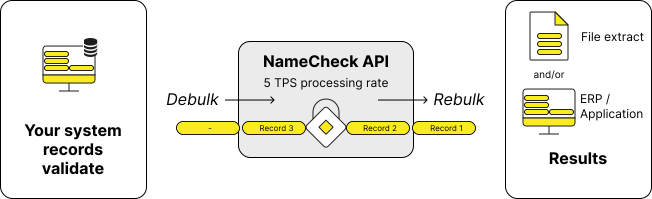
To validate records in batches, your application should:
- Extract records from your system, such as a database, ERP system or data already loaded into your application.
- Break the records into individual NameCheck requests.
- Submit HTTP requests sequentially to the NameCheck API, up to 5 requests per second. See Processing rate limits.
- Collect the response for each request, repeating step 3 until all records have been processed.
- Aggregate the results into a format suitable for your business process.
This "debulk → validate → rebulk" process is implemented entirely within your application.
Processing rate limits
The NameCheck API currently supports a default maximum rate of:
5 transactions, or checks, per second (5 TPS)
There is no limit to the number of records you can submit for validation. Instead, requests should be queued and processed at the supported rate.
If your organisation requires a higher throughput, contact your CommBank Integration Lead to discuss your requirements. Higher transaction rates may be approved on an exception basis.
Estimated processing times
The table below provides an indication of how long different validation volumes may take using the default throughput of 5 TPS.
| Number of records | Estimated validation time |
|---|---|
| 50 | ~10 seconds |
| 250 | ~50 seconds |
| 1,000 | ~3 minutes 20 seconds |
| 5,000 | ~16 minutes 40 seconds |
| 10,000 | ~33 minutes 20 seconds |
These estimates assume requests are processed continuously at the maximum supported rate and do not include any additional processing time within your application.
Building your batch validation solution
Because the NameCheck API accepts individual HTTP requests only, your application is responsible for managing the end-to-end validation process.
A typical implementation includes:
- Reading records from your source system, such as an ERP, CRM or spreadsheet
- Creating one NameCheck request per record
- Managing request sequencing and throughput
- Collecting the API responses
- Producing a consolidated set of validation results
The format used to store or present those results is determined by your implementation and business requirements.
Presenting validation results
Validation results can be presented in whatever way best supports your business processes and payment workflows.
For example, results may be:
- Displayed directly within your application or ERP
- Written back to a database
- Exported into a spreadsheet for review
A spreadsheet might include columns such as:
| BSB | Account Number | Account Name | Match Outcome | Description | Status |
|---|---|---|---|---|---|
| 062-000 | 12345678 | ABC Supplies Pty Ltd | Match | The account name you entered seems to match the account | Ready |
| 062-000 | 87654321 | XYZ Services | No Match | The account name doesn't seem to match the account | Review Required |
Depending on your use case, you may also choose to include additional business-specific information, such as supplier IDs, employee IDs, payment references or internal review status.
Reviewing exceptions
Batch validation allows you to identify records that may require further investigation before future payments are made.
Rather than reviewing every record individually, you can focus on exceptions with validation outcomes such as:
- No Match
- Close Match
- Not Enough Information
- Account Does Not Exist
These records can then be investigated, corrected or confirmed before they are used for future payments.
For more information about each possible result, refer to Understanding Match Results.
Key considerations
When implementing a batch validation solution, remember:
- The NameCheck API processes one record per request.
- Bulk files cannot be submitted directly to the API.
- Your application is responsible for batching requests and consolidating results.
- The default processing rate is 5 transactions per second.
- Higher processing rates may be available upon request.
- CX Messaging Guidelines are intended for interactive customer journeys or single validation requests and generally do not apply to batch validation use cases.
- Customers are required to implement the Data Harvesting Control for batch as well as single record validation. Refer to Business Readiness Requirements for details.