Understanding Match Results
What NameCheck results mean and how to use them
NameCheck compares the account details entered by a user (BSB, account number and account name) against payment data observed by CommBank and returns a result indicating whether those details look reasonably accurate.
It's important to understand what these results mean — and what they don't — so they can be used appropriately within your customer experience.
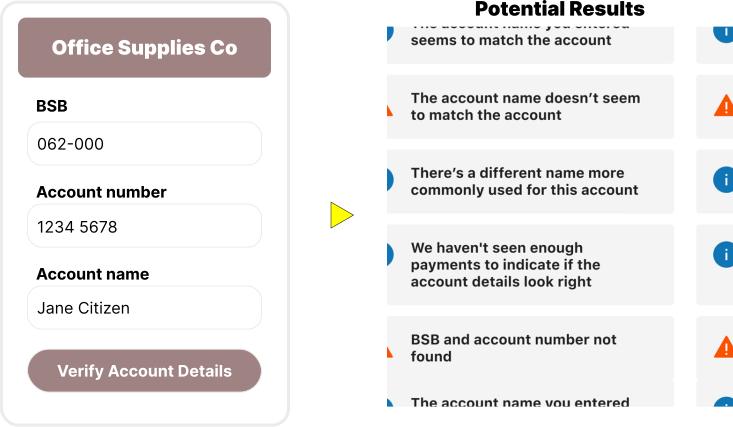
Possible Match Outcomes
NameCheck results generally fall into the following categories:
Match
What this means:
- The details entered look reasonably accurate and matching the most commonly used name for this account.
What this doesn't mean:
- It is not a guarantee that the account is correct
- It does not confirm the identity of the recipient
What you should do:
- Even when a positive match is returned, users should still ensure they are paying the intended recipient.
No Match
What this means:
- The details entered may be incorrect
What you should do:
- Prompt the user to check and correct the details before proceeding
- Encourage them to confirm the exact account name with the recipient if unsure
Weak Match
Example:
- Entered name: John Smith
- Name more commonly associated with this account: Jonathan Smith
- Other variations could include: J Smith, Jon Smith, John B Smith, or Jonthan Smit (typos)
What this means:
- The NameCheck algorithm considered multiple variations and permutations for this account's name. The name entered is similar, but not the most commonly used one.
- There may be differences (e.g. abbreviations, spelling variations, typos) with the name typically used for this account; or
- The account may belong to someone else with a similar name
What you should do:
- Prompt the user to carefully review the details entered
- Encourage them to confirm the exact account name with the recipient if unsure
Not Enough Information
What this means:
- There is insufficient data available to perform a match
- The account could be new; or
- There has not been many transactions made to this account
What you should do:
- Prompt the user to check the details before proceeding
- Encourage them to confirm the exact account name with the recipient if unsure
Account Does Not Exist
What this means:
- There is no data available to perform a match
- The account could be new and has not yet been used; or
- There is a typo in the details entered
What you should do:
- Prompt the user to check the details before proceeding
- Encourage them to confirm the exact account details with the recipient if unsure
Important Considerations
-
NameCheck is not an absolute confirmation of payee details
- It does not verify ownership of an account nor guarantee funds will reach the intended recipient
-
NameCheck results are to be used as guidance
- Results are intended to help users identify potential errors in payee details
- They should always be presented as guidance, not certainty.
- They should not deter users from undertaking further verification, for example by directly contacting payees to confirm their details.
-
NameCheck does not prevent users from proceeding with a payment
- Users always remain in control
- Even with No Match or Not Enough Information outcomes, NameCheck does not prevent users from making a payment (unless your implementation requires it).